- Домашняя страница /
- Электроника /
- Computer Accessories /
- Tablet Replacement Parts /
- Screens /
- Touch Screen Panel Digitizer (Without LCD Dis...
0 ratings




товар №:
77198500
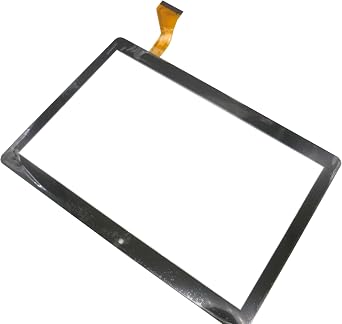
Touch Screen Panel Digitizer (Without LCD Display) Replacement Compatible with Dragon Notepad K10 10.1 inch Tablet (Black)
товар №:
77198500
AMD 8428
Price Details
Excluding Shipping & Custom charges ( Shipping and custom charges will be calculated on checkout )
*All items will import from США
В наличии
 Импортировано из магазина USA
QTY:
На складе осталось всего 7 тов.
Закажите сейчас и получите товар приблизительно Среда, Август 26
Secured transaction
Ubuy works hard to protect your security and privacy. Our advanced payment security system ensures confidentiality by encrypting your information during transmission using AES (Advanced Encryption Standards) and SSL (Secure Socket Layer) protocols. Your payment details are 100% secure as we do not share your payment details with third party sellers.
Our Top Logistics Partners


Broken your Touch Screen Panel Digitizer (without LCD Display), don't need to change new machine, just buy this item and replace your damaged Touch Screen Panel Digitizer (without LCD Display), let your Device work again.

Fast
Shipping

Free
Return*

Secure Packaging

100% Original Products

PCI DSS Compliance

ISO 27001 Certified




Note: Step Down Voltage Transformer required for using electronics products of США store (110-120). Recommended power converters Купите сейчас.


What Stands Out
Precise Compatibility
Designed specifically for the Dragon Notepad K10 10.1 inch tablet, ensuring a perfect fit and seamless integration for hassle-free replacements.
Enhanced Touch Sensitivity
The high-quality digitizer offers exceptional touch responsiveness, providing a smooth user experience and quick access to all tablet features.
Easy Installation
With user-friendly design and included installation tools, this digitizer allows for straightforward DIY replacement, saving time and repair costs.
Информация о продукте
| Product Dimensions (L x W x H) | 1.97 x 1.18 x 0.79 inches (5 x 3 x 2 cm) |
| Item Weight | 1.08 pounds (490 grams) |
| Other display features | Wireless |
| Color | Black |
| Manufacturer | LeHang |
| Date First Available | May 31, 2022 |
Who Should Buy?

-
DIY Repair Enthusiasts
Ideal for users comfortable with electronics repair and seeking a cost-effective solution to replace their tablet screen.
-
Budget-Conscious Users
Perfect for those wanting to extend the life of their Dragon Notepad K10 tablet without investing in a new device.
-
Tablet Maintenance
Suits individuals needing a replacement for damaged touch screens, ensuring continued use of their existing tablet.

-
Non-technical Users
Not suitable for those unfamiliar with electronic repairs, as installation may require technical skills and tools.
ОПИСАНИЕ ТОВАРА
Есть вопрос? Пообщайтесь с нами в чате
Вопросы и ответы клиентов
-
вопрос:
What is the main function of the Touch Screen Panel Digitizer for the Dragon Notepad K10?
отвечать: The Touch Screen Panel Digitizer serves as the interface for user interaction with the Dragon Notepad K10 tablet. It converts touch inputs into signals that the device's software interprets, allowing users to navigate, browse, and interact with applications seamlessly. For instance, if the screen isn't responsive or has cracks, replacing the digitizer ensures your tablet functions like new, restoring its touch capabilities. -
вопрос:
How do I know if I need to replace my tablet's digitizer?
отвечать: Signs that indicate a need for replacement include an unresponsive touch screen, areas of the screen that do not register touch, or physical damage like cracks or scratches. If basic troubleshooting fails, such as rebooting the device or performing a soft reset, it's likely time for a new digitizer. By replacing it, you can regain full control over your tablet, making it functional for everyday tasks like browsing and note-taking. -
вопрос:
Can I replace the digitizer myself, or should I seek professional help?
отвечать: Replacing the digitizer can be a DIY project if you have some technical skills and the right tools, such as screwdrivers and opening tools. However, if you're unfamiliar with tablet repairs, consulting with a professional is advisable. Seeking help can ensure the replacement is done with precision, minimizing the risk of further damage, and allowing you to quickly return to using your tablet without stress. -
вопрос:
Is the digitizer compatible with other models apart from the Dragon Notepad K10?
отвечать: The Touch Screen Panel Digitizer is specifically designed for the Dragon Notepad K10 tablet, ensuring optimal fit and performance. While some similar models may use compatible parts, each model may have distinct dimensions or connector placements. For best results, ensure you purchase components specifically designed for your tablet model to avoid any functional issues after installation. -
вопрос:
What tools will I need to install the digitizer?
отвечать: To install the digitizer, you will require tools such as a small Phillips head screwdriver, a plastic opening tool, and possibly tweezers. Additionally, having a work surface that minimizes static electricity can help avoid damage to your device’s internals. Having the correct tools ensures that the installation process is smooth, allowing you to focus on accurately replacing the digitizer without unnecessary hassle. -
вопрос:
What should I do if my screen is cracked but still responsive?
отвечать: If your screen is cracked yet still responsive, it's advisable to replace the digitizer before the damage worsens. Cracked screens can lead to further deterioration and affect touch sensitivity over time. Addressing the issue promptly not only preserves functionality but also enhances your user experience while using applications like note-taking or browsing, making your tablet safer and more enjoyable. -
вопрос:
What are common troubleshooting steps before replacing the digitizer?
отвечать: Common troubleshooting steps include restarting your tablet, checking for software updates, and performing a factory reset. These actions can sometimes resolve temporary issues with touch responsiveness. If the problems persist despite these measures, replacing the digitizer becomes a practical solution to restore usability and ensure your tablet operates smoothly for tasks such as online reading or digital note-taking. -
вопрос:
Is it safe to use my tablet if the digitizer is malfunctioning?
отвечать: Using a tablet with a malfunctioning digitizer can lead to frustrating experiences such as inadvertent app launches or difficulty navigating. It is advisable to avoid relying on the device for critical tasks until the digitizer is replaced. Continuing to use it in this state may not only hinder productivity but could also result in accidental damage, such as further cracking of the screen or issues with internal components. -
вопрос:
What is the difference between a digitizer and an LCD display?
отвечать: The digitizer and LCD display serve distinct functions within a tablet. The digitizer is responsible for registering touch inputs, while the LCD display presents images and content to the user. If you're experiencing visual issues alongside touch problems, you may need to consider both components for replacement. Understanding this distinction can help you accurately diagnose issues and determine the necessary repairs to restore full functionality. -
вопрос:
Where can I buy Touch Screen Panel Digitizer Without LCD Display Replacement Compatible with Dragon Notepad K10 10.1 inch Tablet Black in Armenia?
отвечать: You can purchase the Touch Screen Panel Digitizer without the LCD display replacement for the Dragon Notepad K10 tablet on Ubuy in Armenia. Ubuy offers a user-friendly platform that provides a range of options, allowing you to choose the best product for your repair needs. With competitive pricing and delivery options, Ubuy makes it convenient for customers to access quality replacement parts.
LeHang Screens Editorial Review
Редакционных отзывов не найдено
Customer Reviews & Ratings
1 оценки клиентов
-
5 звезда
100%
-
4 звезда
0%
-
3 звезда
0%
-
2 звезда
0%
-
1 звезда
0%
Оцените этот товар
Поделитесь своими впечатлениями
Плюсы
- Easy to install
- High sensitivity touch
- Durable and long-lasting
- Compatible with Dragon Notepad K10
- Improved screen responsiveness
Минусы
- No installation instructions included.
Platform Trust & Buyer Confidence

MA
Mohammad
Verified buyer
“Excellent quality and original too,when ubuy send original things I will appreciate that ,I very satisfied thank you”
23 July 2026 · via Trustpilot
CK
Chitra
Verified buyer
“The order and delivery progress was communicated very well. Package arrived within the estimated time. Products arrived as expected in good condition.”
22-Jul-26 · via Trustpilot
K
kund
Verified buyer
“Good supply of products. Safe payment methods, and shipment worldwide! Genuine products.”
23-Jul-26 · via Trustpilot
OO
Onesi
Verified buyer
“Was my first time buying a product from Ubuy, but I found it so helpful. This is reliable. Gonna place a new order!”
22 July 2026 · via Trustpilot
SJ
SAO JOHN
Verified buyer
“Ubuy is a great online platform to buy stuff. Reliable, fast delivery time and great value for money. I've been using Ubuy online shopping platform for three years now and will continue to do so.”
23 July 2026 · via Trustpilot
Безопасное оформление
Global Delivery
Easy Returns
Genuine Products
Product Price History
Важная информация
- Ограничения: обратите внимание, что для товаров, поставляемых за границу, гарантия производителя может быть недействительной; обслуживание от производителя может быть недоступно; руководства по эксплуатации, а также инструкции и предупреждения о безопасности могут быть не на языках страны назначения; товары (и сопутствующие материалы) могут не быть разработаны в соответствии со стандартами, спецификациями и требованиями к маркировке страны назначения; товары также могут не соответствовать напряжению в стране назначения и другим электрическим стандартам (при необходимости требуется использование адаптера или преобразователя). Получатель несет ответственность за обеспечение законного ввоза товара в страну назначения. При заказе через Ubuy или его аффилированных лиц получатель является зарегистрированным импортером и должен соблюдать все законы и правила страны назначения.
- Не все товары на Ubuy выставлены на продажу, поскольку Ubuy — это глобальная поисковая система. На товары распространяются законы в области экспорта и торговли.
AMD 8428
Закажите сейчас и получите товар приблизительно Среда, Август 26
This item is not restrict in my country.(Please click on above link if this item is not restrict in your country, So our team will review and allow.)
QTY:
На складе осталось всего 7 тов.
Secured transaction
PCI DSS compliant and ISO 27001:2022 certified, with encrypted payments and full buyer protection on every order.
Our Top Logistics Partners
Fastest cross-border delivery
Особенности и преимущества
- Replacement Touch Screen Panel Digitizer (without LCD Display)
- Compatible with Dragon Notepad K10 10.1 inch Tablet
- Easy to install, professional technician recommended
- Avoid the need to buy a new machine
- Fragile product, handle with care
- Contact seller for assistance
Ubuy Assurance
Experience worry-free shopping with 100% original products, PCI DSS-compliant payment security, ISO 27001-certified data protection, the fastest cross-border delivery, free returns *, and secure packaging on every order.